


Unlisted - Second Phone Number
2.9180.00 Reviews
App Specs
- Version
- 2024.02
- Updated On
- License
- Free
- Downloads
- 100,000+
- Developer
- FathomTel, Inc.
- Categories
- Communication
- Platform
- Android
Screenshots
 Analysis by AppCompare
Before installing, I’d set one simple expectation: Unlisted - Second Phone Number is meant to give you another line to use from your existing phone, not to replace your carrier or turn one handset into two independent devices. That distinction matters. A second number can make it easier to keep a public-facing contact separate from your personal one, but it still takes a little thought to decide which number belongs on which forms, profiles, and conversations.
It is a free communication app from FathomTel, Inc., with a 2.9 average from 736 ratings and more than 100K installs. Those figures suggest a mixed reception rather than a universally smooth experience, so I would approach it as a practical tool to test against a specific need. The app is marked for Everyone, and its current version is 2024.02; the listed minimum Android requirement is 5.0. Optional in-app purchases range from $2.99 to $99.99 per item, so I would check the choices shown in the app before relying on a particular plan or committing to a longer-term setup.
Why You Might Need a Second Number
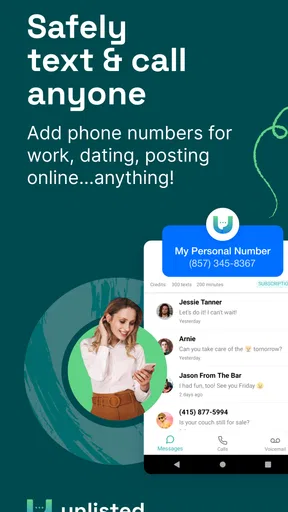
We’ve all been there—hesitant to give out our personal number, but still needing to keep lines of communication open. Maybe you’re running a side hustle and don’t want business calls interrupting your family dinner. Or perhaps you just started online dating and want to keep things safe until you know more about your match. Unlisted has you covered by offering additional phone numbers right from your existing device. No extra SIM card or phone necessary. Intrigued yet?
For a first-time user, the most useful first step is deciding on one clear purpose for the extra line. If you’re using it for customer enquiries, put it on business materials and keep personal conversations on your usual number. If it’s for online listings, use it only for those listings rather than sharing it across every account. This makes the separation meaningful: if unwanted calls arrive, you’ll know which channel brought them in and can adjust where that number is shared.
A second number can also be a temporary boundary rather than a permanent identity. You might use it when arranging a sale with someone you don’t know, coordinating a short project, or sharing contact details with a new group. The practical benefit is not that it removes every privacy risk; it gives you a separate contact point that is easier to keep out of unrelated parts of your life. I’d still avoid sending sensitive personal details just because a conversation is happening on an alternate line.
Getting Started with Unlisted
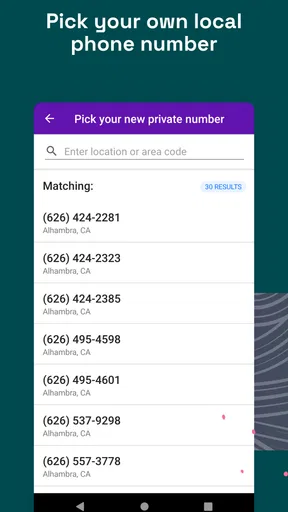
Downloading and setting up Unlisted is straightforward. Available on both Android and iOS platforms, you just head to the Google Play Store or Apple App Store, hit download, and voila! The app walks you through a simple setup process where you choose your new number’s area code—perfect for maintaining a local presence even if you’re traveling. I found this feature especially handy.
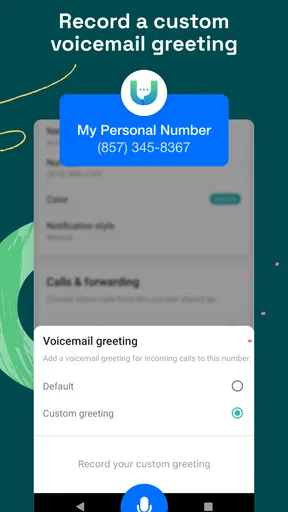
Once you're set up, you can start using your new number immediately for calls and texts. The app even lets you customize your voicemail and offers call forwarding and blocking features. It’s like having a fully functional second line without the hassle of additional hardware.
Worth Reading Before You Choose

EA SPORTS FC Mobile 26 Is a Bigger Football Game, but It Takes Time

Flipboard Shows What News Apps Must Do Beyond the Feed

Switching to Android Auto Means Rethinking Your Driving Routine

Google Calendar Makes a Crowded Week Easier to Manage

Ludo King Makes the Most of the Minutes Between Plans

Baby Panda World Brings Quick Play to Modern Phones, but Its Game Library Feels Busy
To make the first setup less confusing, I’d choose the area code with the people you expect to contact in mind, not simply the one that looks familiar. A local-looking number can feel approachable to someone nearby, while a mismatched area code may make an unexpected call look unfamiliar. Before sharing it widely, send a brief test text to someone you trust and ask them to confirm which number appeared. That small check helps catch a simple but important mistake before the number goes onto a profile or business card.
I’d also set the voicemail greeting before giving the number to anyone. A greeting that identifies the line as a work or project contact helps callers understand they reached the right place without revealing more than you want. If you use the line for different purposes, keep the greeting neutral rather than naming a business or personal detail that could become outdated. Treat the first call and text as a setup check, not just a formality.
Features That Stand Out
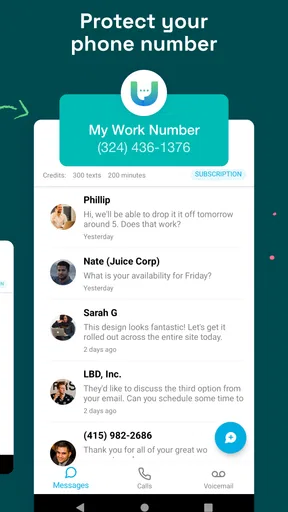
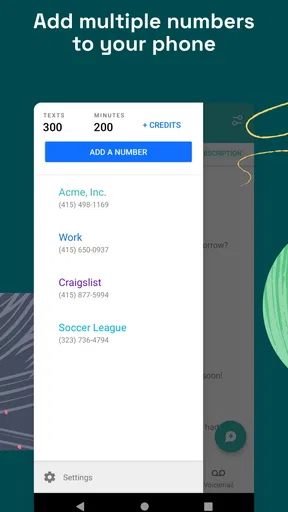
One of the things I really appreciated about Unlisted is its flexibility. You can have multiple numbers on the same device, which is a lifesaver if you're juggling different roles or responsibilities. Plus, you can keep your contacts separate, which makes managing who you communicate with under each number a breeze.
If privacy is a concern, you’ll love the end-to-end encryption for all calls and texts. This means your conversations are kept secure, which is a feature that really gives peace of mind these days.
- Customizable Voicemail: Record personalized greetings for each number.
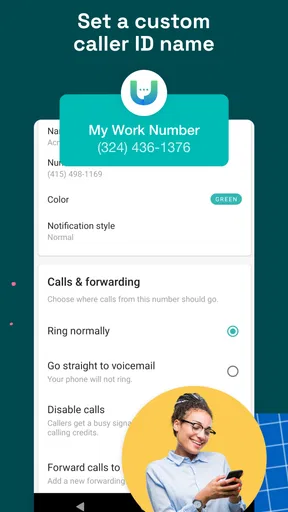
- Call Forwarding: Seamlessly transfer calls to another number if needed.
- Blocking Features: Keep unwanted contacts at bay with an easy block list.
Those controls work best when you decide on a simple routine. For example, I’d use the separate contact list to keep clients or marketplace conversations distinct, then review new contacts before saving them to the wrong place. When a number starts attracting spam, blocking can help contain the nuisance; it won’t stop a person from finding other ways to contact you if you have shared other details. Call forwarding can be useful when you need to receive a call somewhere else, but it is worth checking the destination carefully so you don’t accidentally route a private conversation to a shared or work line.
One trade-off is that a second number can add organization while also adding another inbox to monitor. If you forget to check it, you may miss a time-sensitive message; if you keep every notification active, you may recreate the interruptions you were trying to avoid. I’d decide in advance when to check the extra line and which calls deserve an immediate response. That habit is especially helpful for a side business: customers can reach a dedicated number, while you retain some control over when you engage.
Pricing and Plans
Now, let's talk about pricing. Unlisted operates on a subscription model, which I found to be quite reasonable. You can choose between monthly or yearly plans, and the flexibility to cancel anytime is a nice touch. There’s also a free trial period, so you can test the waters before committing.
The subscription covers unlimited calls and texts to the US and Canada, which is great if you’re frequently on the phone or sending messages. I found the pricing structure to be competitive, especially considering the value of having a second line without needing a new device.
Because the app is free to install but offers in-app purchases, I’d separate “getting the app” from “having the service arrangement I need.” Check the purchase screen for the particular option and terms presented to you, especially if you only need a number for a brief task. A free download does not automatically mean every use case is cost-free, and the range of purchase amounts makes it sensible to verify what you’re selecting before confirming.
For a short project, compare the expected cost and commitment with simply using your existing number and tighter sharing habits. For recurring customer calls, the convenience of a dedicated line may justify paying for a separate service. The right choice depends on how often you expect to use it and how much value you place on keeping those conversations apart, rather than on the idea of having an extra number for its own sake.
Who Would Benefit Most?
Whether you’re a freelancer, a business owner, or someone who just values their privacy, Unlisted is a pretty compelling option. It’s perfect for anyone needing to separate work and personal life without the clutter of multiple devices. And for those who travel frequently, having a local number wherever you are is a huge plus.
Even if you’re just someone who wants to keep certain parts of your life compartmentalized, this app makes it simple and efficient. Plus, the security features ensure your communications remain private and secure.
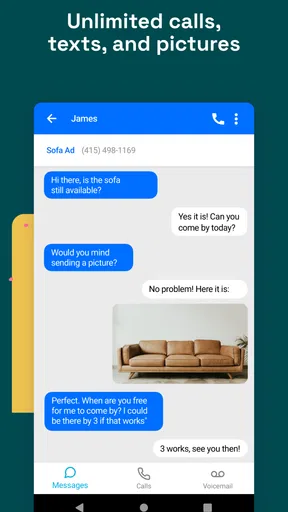
A realistic everyday example is a weekend furniture sale. I could share the additional number with prospective buyers, use it to arrange a pickup, and keep my main number off a public listing. Once the item is gone, I could stop sharing that contact point and block an unwanted caller if needed. For a freelancer, a similar workflow is to put the alternate number on a proposal, set a greeting that fits client calls, and keep personal contacts on the regular line. These are small boundaries, but they make it easier to see which conversations need attention.
The app is a better fit when people need to reach you by voice or text and you want those conversations kept apart on one device. It is less suitable if you need a separate physical SIM, a dedicated work handset, or a business phone system with shared team access and centralized administration. In those cases, a second SIM or a more complete business-phone service may be a better match. If your only concern is occasional spam, call screening or your carrier’s blocking tools may be simpler than maintaining another number.
Compared with using your regular number everywhere, an alternate line gives you a clearer boundary and a contact point you can reserve for selected situations. Compared with carrying a second phone, it avoids extra hardware, though it also means both lines live on the same device and share your attention. A second SIM can offer a more direct separation at the phone level, while this app’s appeal is the convenience of managing another number through an app. I’d choose based on whether ease of access or stronger separation matters more in your daily routine.
One question first-time users often have is whether people need the app to contact the extra number. The practical way to think about it is as a phone number you can share for calls and texts, rather than an invitation that only works inside an app. Still, before depending on it for an important contact, test both an outgoing and an incoming message with someone you know. That confirms the number is being used as intended and gives you a chance to get comfortable switching between the two lines.
Another useful question is what happens when the purpose for the line ends. I’d remove it from listings and profiles where you posted it, update any contacts who still need to reach you, and review the voicemail and forwarding choices you set up. A separate number is not a substitute for cleaning up old contact details. This simple close-out step reduces the chance that a future caller assumes the line is still monitored.
In a world where digital privacy is becoming more and more crucial, having a solution like Unlisted - Second Phone Number just makes sense. It’s not just about convenience; it's about taking control of your communication channels in a smart and safe way.
So, if you're in need of a second number or even multiple numbers, give Unlisted a try. It offers a seamless experience, and I dare say, it might just become one of those essential apps on your phone.
My honest recommendation is to start with one use case, test the number with a trusted contact, and check the purchase terms before you rely on it. If the extra line makes your day easier without becoming another inbox you have to manage, it is doing its job. If you need stronger separation, team tools, or a guaranteed fit for a specialized calling setup, compare other options before moving important communications over.
Pros
- Easy to set up and use right away.
- Multiple numbers for different needs.
- Affordable pricing with no contracts.
- Good call quality and reliability.
- Custom voicemail for each number.
Cons
- Limited features in free version.
- Occasional app crashes reported.
- No support for international numbers.
- Call forwarding can be slow.
- Ads in the free version can be intrusive.
FAQs for Unlisted - Second Phone Number
What is Unlisted - Second Phone Number and how does it work?
Unlisted - Second Phone Number is an app that allows users to create a temporary or secondary phone number on their existing smartphone. This can be used for various purposes, such as separating work from personal calls, managing online transactions, or maintaining privacy. The app assigns a new number without the need for an additional SIM card.
Is Unlisted available for both Android and iOS devices?
Yes, Unlisted is available for download on both Android and iOS devices. Users can easily find the app in the Google Play Store or Apple App Store, ensuring compatibility with their respective operating systems. The app provides a seamless experience across both platforms, maintaining consistent features and performance.
Are there any subscription fees or costs associated with using Unlisted?
Unlisted offers both free and premium options. The free version includes basic features, while the premium subscription provides additional functionalities such as unlimited calling, texting, and multiple numbers. Users can choose a plan that suits their needs, and the pricing is typically transparent and competitive, ensuring value for money.
How secure is the Unlisted app in terms of privacy and data protection?
Unlisted places a strong emphasis on user privacy and data protection. The app uses encryption to secure communications and ensures that personal information is kept confidential. It complies with data protection regulations and does not sell user data to third parties, making it a trustworthy choice for those concerned about privacy.
Can I use Unlisted internationally, and what are the limitations?
Unlisted can be used internationally, but users should be aware of potential limitations. While calling and texting may work across borders, international rates may apply depending on the region and the user's subscription plan. It's advisable to check the app's terms or contact support for specific details on international usage.


